The PCIe x1 slot has only one PCIe lane. Although there is only one PCIe lane, the PCIe x1 slot can be used for a variety of low-power PCIe peripheral cards. The PCIe x1 slot is the smallest PCI Express slot and has the lowest throughput compared to larger PCIe slots such as the PCIe x16 slot. However, PCIe x1 cards can be installed into all PCIe expansion slots, including x4, x8, and x16 PCIe slots. Often people underestimate their role in PCIe x1 slots. This article will introduce which peripheral expansion cards connect to PCIe x1 slots.
What is the main purpose of PCIe X1 slot?
Although PCIe x1 slots have a PCIe lane, they are still useful, and in some cases, use PCIe x1 slots instead of larger slots such as PCIe x16 to maintain optimization. Here are some expansion cards that can be plugged into PCIe x1 slots.
1. Modem and network card
Wired or wireless expansion cards can be added to the motherboard via the PCIe x1 slot. A PCIe x1 WiFi card or a 1G PCIe Ethernet card can be connected to the PCIe x1 slot. Motherboards usually already have Ethernet built in. However, a PCIe x1 Wi-Fi card is one way to add Wi-Fi connectivity to your computer. The PCIe x1 slot supports all types of wireless network cards, including the latest Wi-Fi 6 protocol. However, a PCIe x1 slot can only support 1 Gigabit Ethernet or RJ45 Ethernet LAN (Local Area Network) card; for 10GbE expansion, a PCIe x4 slot is required.
2. Sound card
Usually a sound card is not necessary as most motherboards have a built-in audio chipset. However, some audiophiles or people who pay more attention to sound quality can install a sound card on the PCIe x1 slot to obtain higher sound quality and more accurate sound. With a sound card installed in a PCIe x1 slot, your computer can get better sound, more ports, and better electromagnetic interference shielding.
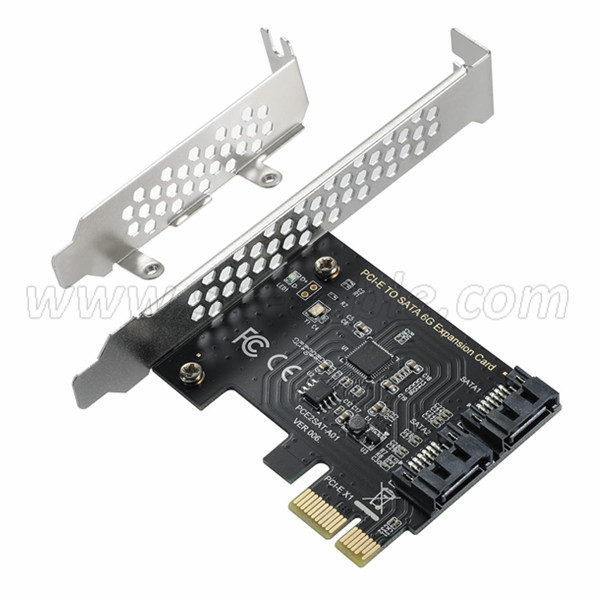
3. SATA expansion card
When you want to add more SATA hard drives to your computer, you can use a PCIe x1 SATA expansion card to add more SATA ports. The third generation PCIe x1 slot features 1Gbps data transfer speeds and can handle multiple SATA expansions via SATA SSD (Solid State Drive) or SATA HDD storage. Since the data transfer speed of SATA SSD is about 550 Mbps and the data transfer speed of SATA HDD is about 150 Mbps, PCIe x1 SATA card will not have any problem in handling multiple SATA storage drives which is perfect for NAS (Network Attached Storage) system. question.
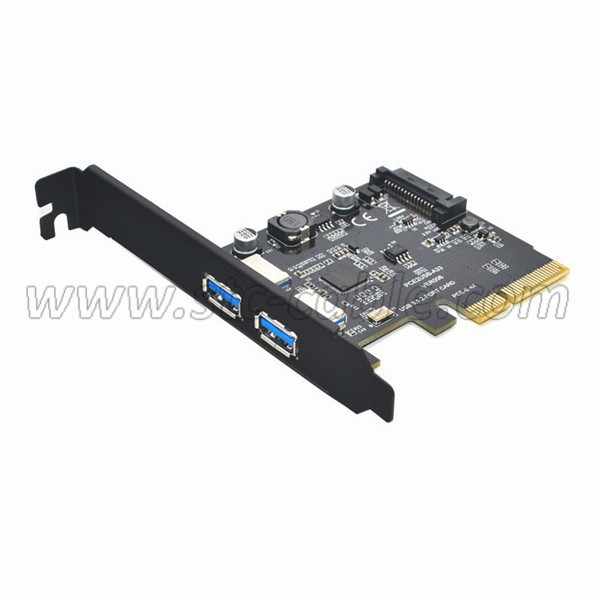
4. USB port expansion card
PCIe x1 can also support USB port expansion. Therefore, if your computer needs more USB ports, you can use a USB PCIe x1 card to add more USB 3.0 type A or even USB type C ports to your computer. Additional I/O can be added via PCIe x1 slots, just look for I/O expansion cards with the PCIe x1 form factor.
5. Tarjeta sintonizadora de TV
Otro uso de las ranuras PCIe x1 es para tarjetas sintonizadoras de TV. El uso de una tarjeta de TV PCIe x1 permite que el dispositivo reciba señales de TV directamente en la computadora, convirtiendo la computadora en un televisor. Algunas tarjetas incluso permiten que su computadora grabe programas de TV en vivo directamente desde el cable para verlos más tarde.
6. Tarjeta de captura de vídeo
Las tarjetas de captura de video permiten que una computadora reciba cualquier fuente de video de una cámara u otro dispositivo externo (como una consola de juegos, un televisor o un reproductor de DVD) y convierta estas señales de video en datos digitales que se pueden almacenar en la computadora. Estos datos convertidos se pueden transmitir en tiempo real o guardar para editarlos más adelante. Normalmente, la captura de vídeo FHD utiliza tarjetas de expansión PCIe x1, mientras que más tarjetas de captura HD 4K requieren al menos ranuras de expansión PCIe x4 para manejar los requisitos de ancho de banda.
7. Tarjeta vertical PCIe
Si su placa base requiere más ranuras PCIe, puede usar unatarjeta vertical PCIe, también conocido como divisor. Cabe señalar que la tarjeta vertical PCIe solo aumenta la cantidad de ranuras, mientras que el ancho de banda de PCIe permanecerá sin cambios y se distribuirá uniformemente entre las ranuras PCIe de la tarjeta vertical. Por lo tanto, una tarjeta vertical con cuatro ranuras PCIe x1 conectadas a una ranura PCIe x1 tendrá una cuarta parte del ancho de banda PCIe x1 en cada ranura.
Envíanos tu mensaje:
Hora de publicación: 18-nov-2023